Board-ready reports, built from live NetSuite data
Assemble the monthly pack from income statement, balance sheet and cash flow blocks, KPI tables, charts and commentary. Compare periods and download the finished pack as a print-quality PDF. The numbers come from NetSuite, not from a spreadsheet someone rebuilt on Sunday night.
- Read-only toward NetSuite
- Connect in about 15 minutes
- 7-day free trial on your first instance
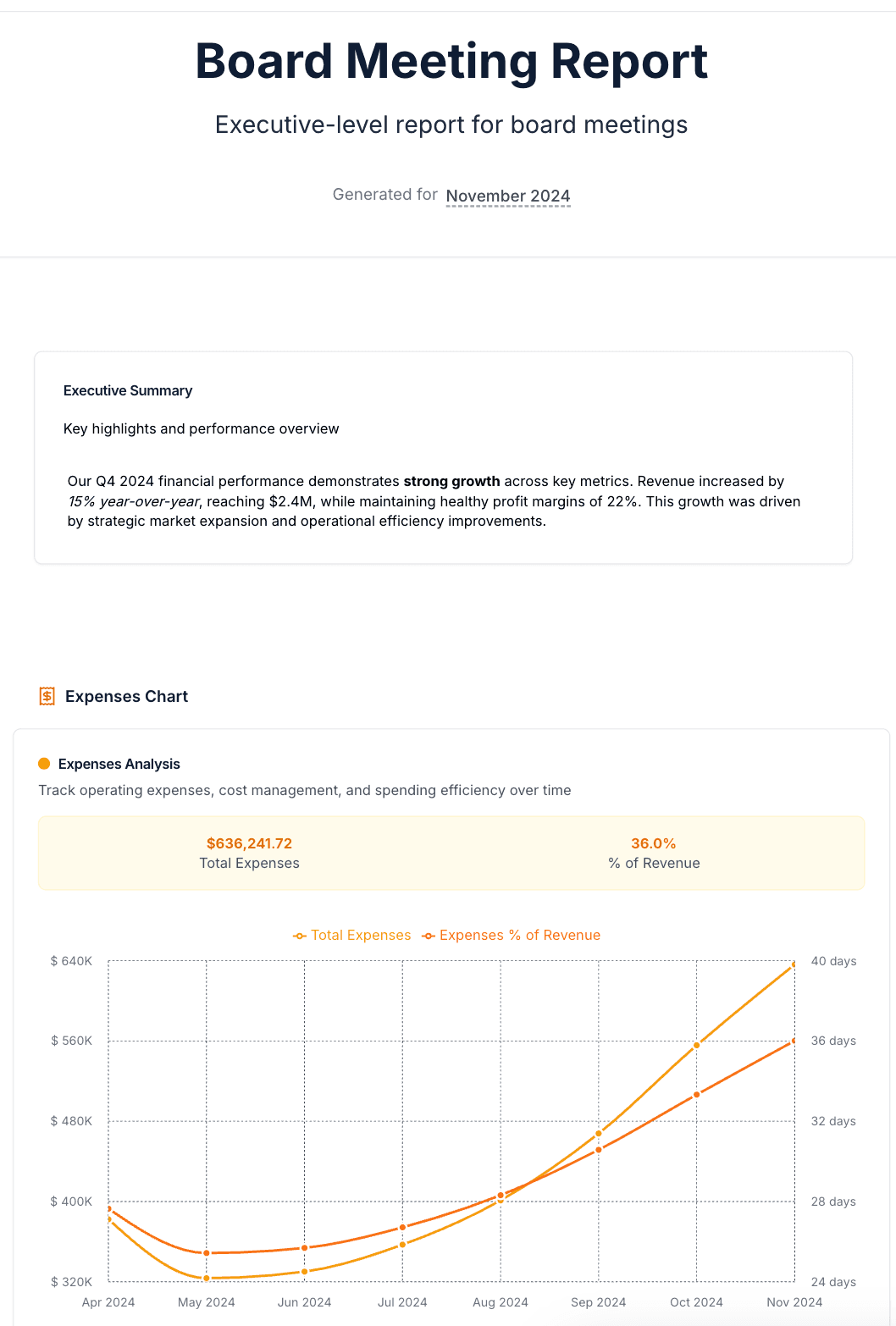
- Full statements: income statement, balance sheet, cash flow
- 3
- Report templates, from Monthly Financial Summary to Cash Flow
- 7
- Print-quality export for the board pack
- Typical time to connect NetSuite
- 15 min
How it works
From NetSuite login to a finished pack in one sitting
Setup is a connection, not a project.

- 1
Connect NetSuite
Authorize FinanceIQ against your NetSuite account. The connection is read-only toward the ERP and takes about 15 minutes. The first sync pulls in your history.
- 2
Pick a template, set the period
Start from Monthly Financial Summary or another template, or build from blank. Choose the period and comparison once and every block follows it unless you pin one.
- 3
Download the PDF
Render a print-quality PDF for the board folder, or export a single block on its own as PNG, CSV or XLSX.
What you get
The whole management pack, from one source of numbers
Report blocks read the NetSuite general ledger when they render, so what the board sees is what the close produced.
Financial statements
Full statements as report blocks
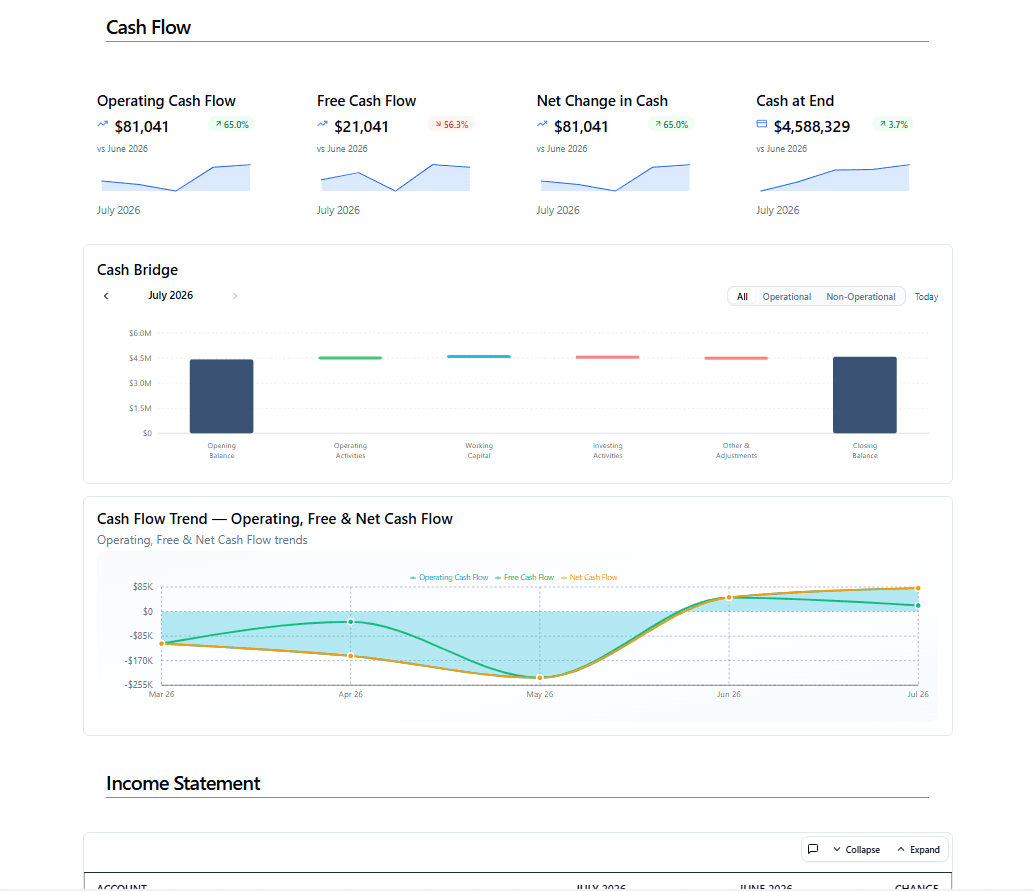
Drop an income statement, balance sheet or cash flow statement into the report and it renders from your NetSuite general ledger, at the detail level you choose, with the comparison you choose.
- Current versus prior month, quarter or year, side by side with the change
- Expand or collapse sections; show account detail or summary lines
- Break statements into dimension columns by subsidiary, department, class or location
- Unfamiliar account types land in a visible Unclassified section instead of disappearing
Charts and tables
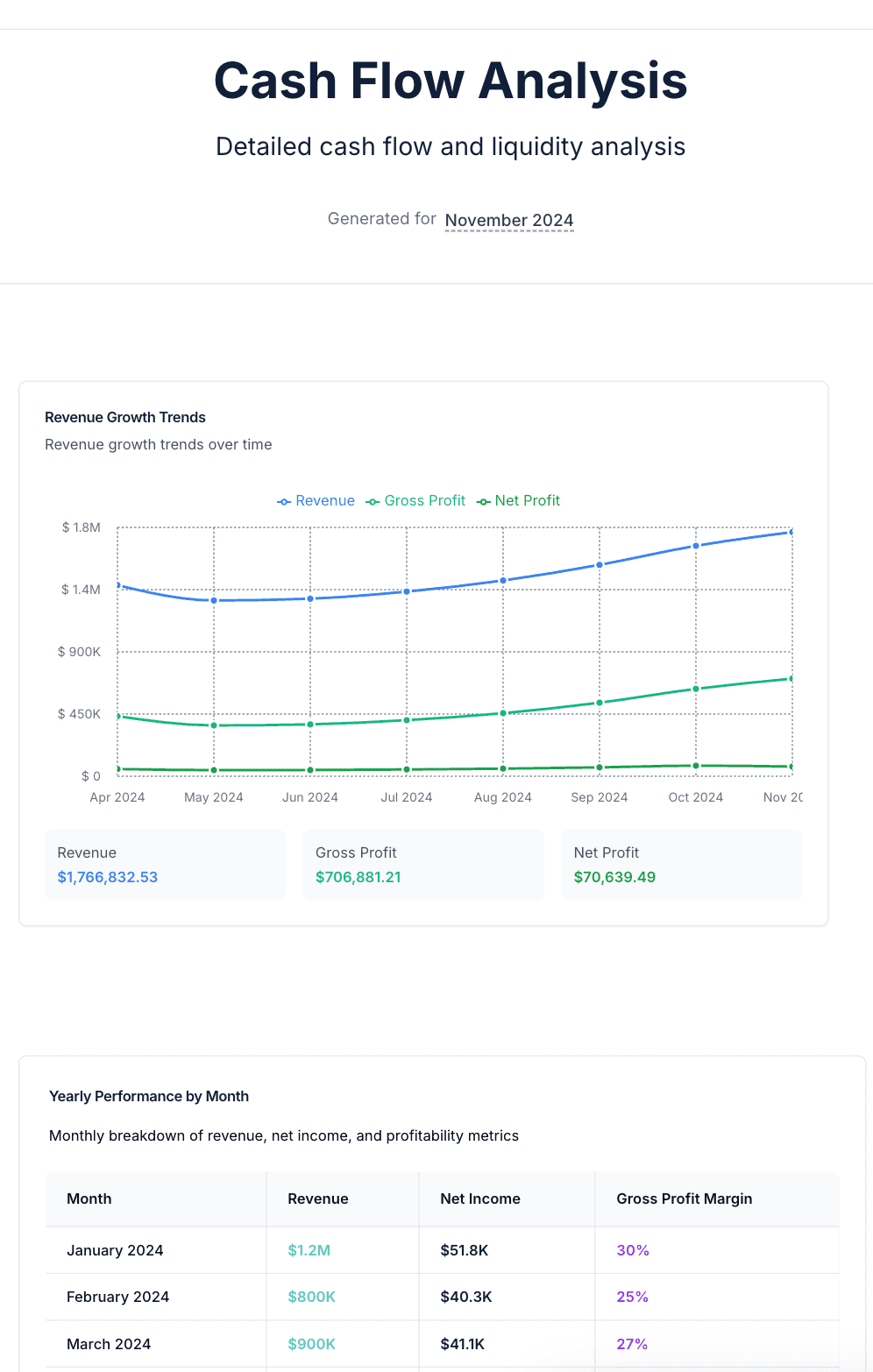
Charts, KPI tables and rankings from the same ledger
Everything on the dashboard side is available as a report block, so the chart in the pack and the chart on the board never disagree.
- Revenue, expense, profitability and cash flow trend charts
- KPI tables and quarterly tables for the numbers the board tracks
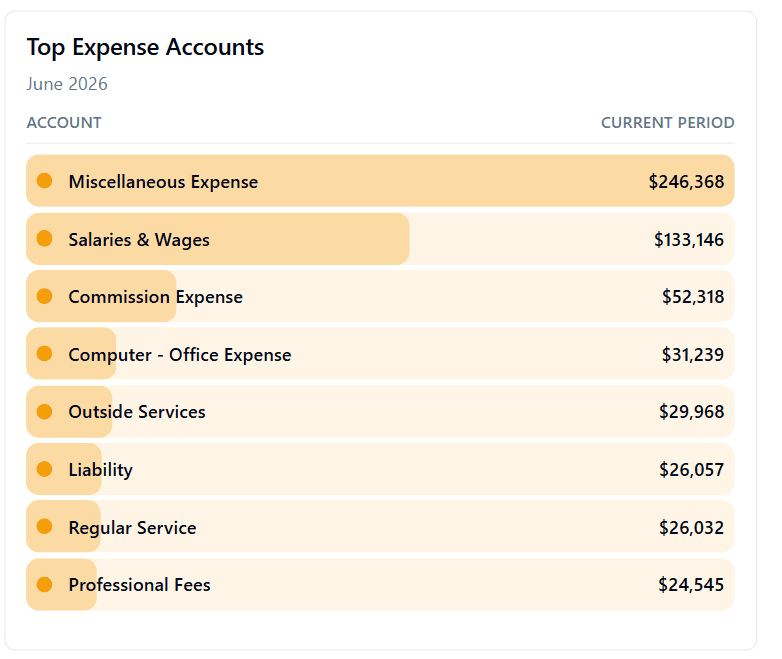
- Top revenue and top expense account rankings, breakeven and cash bridge
- Donut breakdowns by dimension and GL account comparisons
Commentary
Narrative with an AI first draft you approve
Text blocks hold the executive summary and the notes under each section. Ask for AI Commentary and Finley drafts it from the numbers on the page; you edit, approve or reject before anything is saved.
- Rich text with headings, emphasis and lists
- AI Commentary grounded in the block's own figures and period
- Nothing is stored until you approve the draft
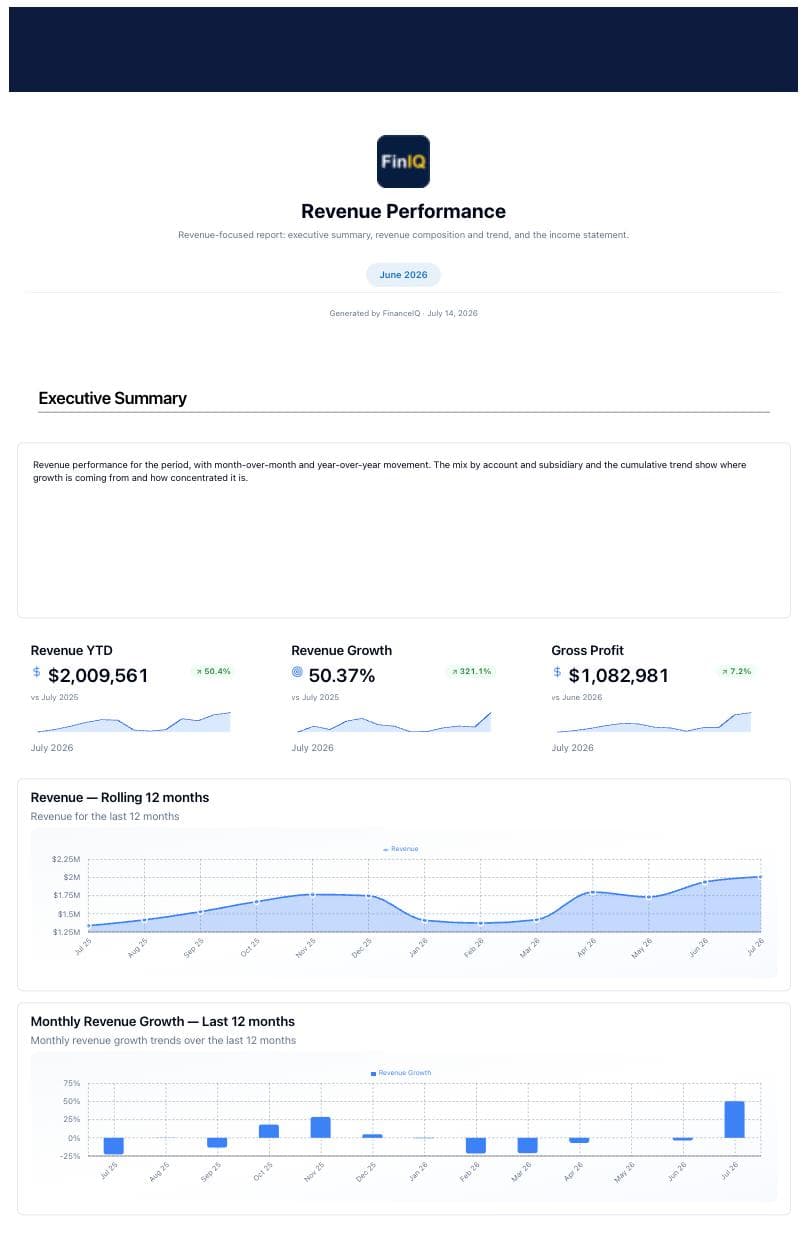
- Cover pages and page breaks for a clean printed pack
Delivery
Download the finished pack as a PDF
When the pack is ready, render a print-quality PDF with a cover page and page breaks. Send it to the board, the investors or the auditors like any other document, and re-render it in a click when a late entry lands.
- Print-quality PDF with cover page and page breaks
- Recipients need neither a FinanceIQ account nor a NetSuite license
- Export any single block on its own as PNG, CSV, XLSX or PDF
- Start from any of the seven templates below, or from a blank report
Templates
Seven report templates, one spine
Cover page, executive summary, one topic per page, then the full statement at the back. Every template below ships inside FinanceIQ.
- Standard
Monthly Financial Summary
The full monthly report: executive summary, revenue, profitability, expense and cash flow analysis, then income statement and balance sheet.
Includes
- Executive Summary
- Revenue Analysis
- Profitability
- Expense Analysis
- Cash Flow
- Income Statement
- +1 more
- Analysis
Revenue Performance
Revenue-focused report: executive summary, revenue composition and trend, and the income statement.
Includes
- Executive Summary
- Revenue Analysis
- Income Statement
- Analysis
Profitability & Margins
Profitability report: margin highlights, breakeven and margin trends, and the income statement.
Includes
- Executive Summary
- Profitability Analysis
- Income Statement
- Analysis
Cost & Expense
Cost report: cost-structure highlights, expense composition and top accounts, and the income statement.
Includes
- Executive Summary
- Expense Analysis
- Income Statement
- Analysis
Cash Flow
Cash report: liquidity highlights, cash bridge and cash-flow trends, and the cash flow statement.
Includes
- Executive Summary
- Cash Flow Analysis
- Cash Flow Statement
- Analysis
Liquidity & Capital Structure
Position report: liquidity and leverage highlights, capital-structure trends, and the balance sheet.
Includes
- Executive Summary
- Position Analysis
- Balance Sheet
- Analysis
Inventory Review
Inventory report: the valuation summary with its GL tie-out, the breakdown by location, class, subsidiary and top items, and the balance sheet.
Includes
- Inventory Valuation
- Inventory Breakdown
- Balance Sheet
Each template is an editable starting point: swap blocks, change the period and comparison, add commentary, then download the finished pack as a PDF.
Included with every instance
Ask Finley to explain the variance before the board does
Finley is the AI analyst inside FinanceIQ. It answers in plain English from your accounts, your dimensions and your history, and it can draft the commentary or add the block that answers the question to your report.
- Grounded in your synced NetSuite data, not a generic model
- Explains movements in the statements and breaks them down by dimension
- Drafts report commentary that you approve before it saves
Why is operating cash flow up 65% versus June when net income barely moved?
Working capital released $312K: receivables fell as two large invoices were collected and payables extended by nine days. Net income was flat, so almost all of the increase is timing rather than profitability.
Illustrative exchange. Finley answers from your own NetSuite data and is an analysis tool, not a licensed financial advisor.
Before and after
Same close. A very different week before the board meeting.
What changes when the report reads from the ledger instead of from an export.
| Spreadsheet-built board pack | FinanceIQ report | |
|---|---|---|
| Where the numbers come from | Exports pasted into Excel, then into slides | Read from the NetSuite general ledger when the report renders |
| Period comparisons | A formula per line, rebuilt each month | Pick current versus prior month, quarter or year on the block |
| Statement formatting | Fixed by hand after every export | Statement blocks that already know sections, totals and account types |
| Commentary | A blank page the night before | An AI first draft from the page's own figures, approved by you |
| A late journal entry | Redo the export, the paste and the PDF | Sync, and the report re-renders |
| Another entity | Start the workbook over | Change the subsidiary filter |
Who it's for
Built for the people who sign the pack
CFOs and VPs of Finance
Present a pack whose every number traces to the general ledger, and spend the meeting on the story instead of the reconciliation.
Controllers
Statements rendered from the same ledger your close produced, with the comparison columns already in place.
FP&A analysts
Variance and trend charts by dimension, quarterly tables and KPI tables, all from blocks instead of workbooks.
Fractional CFOs and advisors
Connect each client's NetSuite as its own instance under one login and run the same pack for every one of them.
Security
Your books stay in NetSuite. Your data stays yours.
FinanceIQ is a reporting layer on top of NetSuite, not a replacement for it. The connection reads your financials; it never posts, edits or deletes a transaction. NetSuite remains the system of record.
Read-only toward the ERP
FinanceIQ reads the general ledger, AR, AP and reporting segments. It cannot write to NetSuite.
Encrypted end to end
TLS 1.2 or higher in transit, including to the NetSuite API. AES-256 at rest.
Isolated per tenant
Row-level security at the database layer keeps each instance's financial data separate.
Compliance roadmap
SOC 2 Type I audit planned for Q4 2026. Our Security page and Trust Center publish the current posture.
Built by an operator, not a vendor
“No matter the role, the problem was always the same: critical business data was trapped behind saved searches, disconnected reports, and overly complex workflows. The information existed, but monitoring business health and supporting executive decision-making was far harder than it should have been.”
Tim Wallace
Founder, FinanceIQ. Former CEO, fractional CFO and NetSuite consultant.
FAQ
Questions finance teams ask before they connect
Which financial statements can a report include?
Income statement, balance sheet and cash flow statement, each as a block with period comparisons and optional dimension columns. Alongside them you can add trend charts, KPI tables, quarterly tables, top account rankings, breakeven and cash bridge charts, donut breakdowns and text.
Can I compare periods in a report?
Yes. Set the report period once and every block follows it. Statement blocks add a comparison column for the prior month, quarter or year, and any block can be pinned to its own period when the pack needs it.
Can I export the report to PDF?
Yes. Reports render to a print-quality PDF with cover pages and page breaks, ready for the board folder. Any single block can also be exported on its own as PNG, CSV, XLSX or PDF.
How do I send a report to the board or to someone without a FinanceIQ login?
As a PDF. Download the finished report and send it like any other document; the recipient needs neither a FinanceIQ account nor a NetSuite license. Reports are distributed as PDFs rather than live pages, so what the board receives is exactly the version you reviewed and signed off.
How does AI Commentary handle my financial data?
Finley drafts commentary from the figures on the block you ask about, and only the data needed to answer that request is sent to the AI provider. The draft is not saved until you approve it, and you can reject it outright. Our AI Disclosure page describes the full data flow.
Do you support QuickBooks, Xero, Sage or other ERPs?
No. FinanceIQ is built exclusively for Oracle NetSuite, which is what lets statement blocks understand your accounts, periods and dimensions without configuration.
Does FinanceIQ change anything in NetSuite?
No. The connection is read-only toward the ERP. FinanceIQ reads the general ledger, receivables, payables and reporting segments. It never posts, edits or deletes a transaction. NetSuite stays the system of record, and the security posture (TLS 1.2 or higher, AES-256 at rest, row-level tenant isolation, SOC 2 Type I audit planned for Q4 2026) is published on our Security page.
Ship next month's board pack from NetSuite, not from a spreadsheet
Start a 7-day free trial, connect NetSuite in about 15 minutes, and download your first board pack as a PDF the same day.
- Read-only toward NetSuite
- Connect in about 15 minutes
- 7-day free trial on your first instance